

Book a Free Consultation Now
Would you like to know more about this topic?
Contact us on WhatsApp and get a free consultation from our experts
Contact on WhatsApp NowWhat are lookalike audiences on Facebook?
Lookalike audiences on Facebook are audience groups created to help advertisers reach new people who are likely to be interested in their business because they share similar characteristics with an existing audience. Facebook analyzes behaviors, interests, and demographics of a source audience, then finds users with comparable patterns. This method allows advertisers to scale campaigns efficiently while maintaining relevance. Using Similar audiences on Facebook enables businesses to expand reach without sacrificing targeting accuracy.
These audiences are especially powerful for growth-focused campaigns because they are based on real data rather than assumptions. Instead of guessing who might convert, advertisers rely on Facebook’s algorithm to identify users who resemble their best customers. This approach improves efficiency, lowers acquisition costs, and supports scalable advertising strategies across different markets.
Lookalike audiences are closely connected to custom audiences, data-driven targeting, Facebook Ads optimization, audience expansion strategies, and conversion-focused advertising, all of which help brands grow beyond their existing customer base. When built correctly, they allow advertisers to reach high-potential users while maintaining strong performance signals.
Key aspects of lookalike audiences include:
-
They are created based on a high-quality source audience.
-
Facebook uses behavioral and demographic signals to find similarities.
-
Lookalike audiences help scale campaigns efficiently.
-
They maintain relevance while expanding reach.
-
Performance improves when the source audience is conversion-based.
-
They are ideal for prospecting and growth campaigns.
What are similar Audiences built from?
Similar audiences are built from source audiences that represent valuable user actions or strong engagement signals. These sources can include customer lists, website visitors, app users, lead submissions, or purchase events. Facebook analyzes the selected source audience to identify common traits and patterns, then uses this data to build a new audience of users who behave similarly. With Similar audiences on Facebook, the quality of the source directly determines the effectiveness of the resulting audience.
The stronger and more specific the source, the better the similarity modeling becomes. For example, a source based on recent purchasers will produce higher-quality similar audiences than a source based on generic page visitors. This allows advertisers to control performance outcomes by choosing the most relevant data inputs for audience creation.
Similar audiences are commonly built from customer lists, website traffic, app activity, purchase events, and lead generation data, all of which influence how accurately Facebook can model new users. Choosing the right source is a strategic decision that impacts reach quality and conversion potential.
Common sources used to build similar audiences include:
-
Website visitors tracked through Meta Pixel.
-
Customer email or phone lists uploaded securely.
-
App users and in-app events.
-
Lead form submissions and registrations.
-
Purchase and high-value conversion events.
-
Engagement with ads or social content.
What are the four types of target Audiences?
The four types of target audiences define how advertisers reach users on Facebook based on familiarity, intent, and similarity. These audience types allow businesses to structure campaigns according to different stages of the customer journey, from awareness to conversion. Understanding these categories helps advertisers apply the right strategy for each campaign objective. Through Similar audiences on Facebook, businesses can effectively move from known audiences to new, high-potential users.
Each audience type serves a specific purpose, whether targeting existing customers, re-engaging interested users, or reaching entirely new prospects. When used together, these audience types create a complete targeting framework that supports both short-term conversions and long-term growth.
The four audience types are closely associated with core audiences, custom audiences, lookalike audiences, retargeting strategies, and prospecting campaigns, forming the foundation of Facebook Ads targeting.
The four main types of target audiences include:
-
Core audiences based on demographics, interests, and behaviors.
-
Custom audiences created from existing user data and interactions.
-
Lookalike audiences built from high-performing source audiences.
-
Retargeting audiences focused on users who previously engaged or converted.
How to Create Like Audiences on Facebook
- To create Similar audiences on Facebook, go to “All Tools” and then select “Audience”.
- From the “Create Audience” button, select “Lookalike Audience”.
- The first page appears, asking you to select the source from which you want to create Similar audiences on Facebook. This source consists of two options, which are “Value based sources” and here it is presented to other sources such as pixels and product catalogs..
- If you choose the pixel, it will show you an audience similar to the audience that has already made a purchase from your site. Therefore, it is called “Value based sources” because it is related to the value of public purchases. It is supposed to show you the stats of the pixels that you have chosen. Get to know the highest value of purchases, lowest purchase value, and the number of people who have purchased from the site in the last 60 days, as we see:
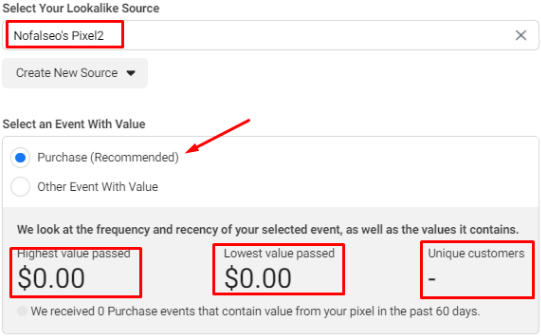
- We find here that he chose “Purchase” We can change the event to any event we choose. But if you choose “Value based sources” and this is the best “Purchase” event we can choose. He will thus prepare an audience with the characteristics of the audience who has already purchased from the site, and this is much better for achieving sales.
- The next option asks you to locate the audience you want to create.
- After that, you will be asked to determine the percentage of the audience. Note that the higher the value, the larger the audience. But also note that the larger the audience, the smaller the interests they have in common. But the smaller the audience, the more it selects an audience similar to the audience that has already purchased from your site.
- It is better for you to keep the percentage 1% in order to get an audience similar to the one who has already purchased from your site.
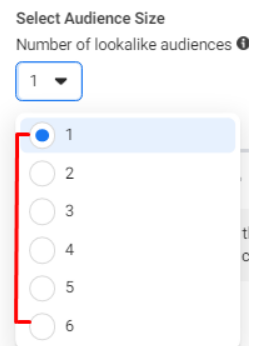
- We can also choose more than one slide for the audience if I choose (1). This means that I want to make one slide, but if I choose 2, as we see:
- Here you have an audience of each audience for the segment you have chosen as we can see:
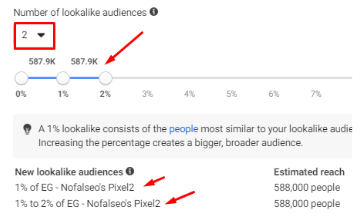
- We can increase the number of audience and the number of segments as we want.
- Finally, if you click on the “Create Audience” button, a message will appear stating that it cannot create lookalike audiences on Facebook. This is because the source, which is the pixel here, must have been purchased by at least 100 people from the same country, as we see:

- In this case, the pixel needs to work more or the sales volume increases more so that you can create a similar audience using the pixel as a source.
- We go again to the audiences page or the “Audience” and choose “Lookalike Audience”, but this time we will choose the “other sources” and in this choice it will display all the custom audiences that you created before, in addition to my pages, where I can Request to create a similar audience not a page you choose as we see:
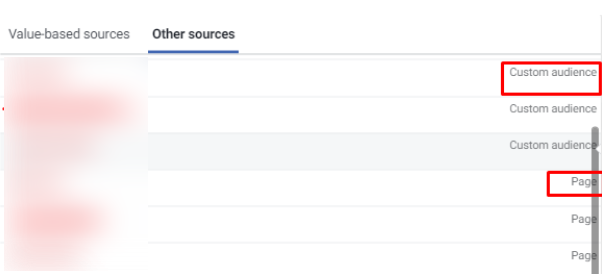
- You can choose any audience, either from the custom audiences you created or from the audience of any page, as shown in the image.
- Suppose I choose a page (Nofal SEO).
- Then I select the country, let it be Egypt and Kuwait. This means that I have selected the audience you want, which is the audience that is similar to the audience who visited the page (Nofal Seo from Egypt and Kuwait).
- We select the slides you want, and they are often one slide.
- After that we click on “Create Audience” as we see:
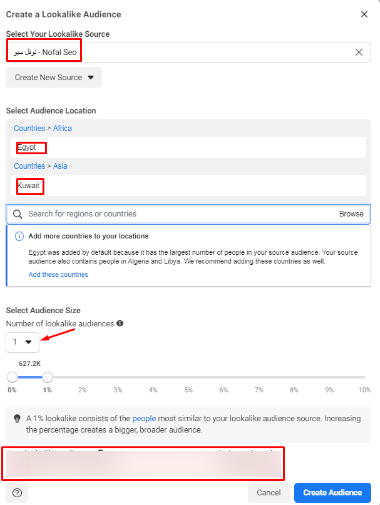
- We find here that he created the audience with the specifications you asked
And we see here that he is still in the “populating” stage, that is, he settles the masses in their places until he gives you the correct number at the end, and this stage takes from one to two hours. But you can use it now as you want, but it is preferable to wait for the “populating” to work in order to get the sure number of the audience. This is how you got Similar audiences on Facebook. But here is a question that arises
How do I use custom and lookalike audiences to make ads?
In order for us to use Custom Audiences and Lookalike Audiences on Facebook. Return to the Ads Manager page and from the “Campaigns”
- We create any advertisement, let it be “Traffic”.\
- We go to the “Ad Set” page, and from the “Audience” section. In this case, we will not choose a saved audience and we will not create a new audience. We will choose from the list called “Custom Audiences”.
- By clicking on this option, you will see a list of all audiences, custom audiences, and similar audiences, as we see:
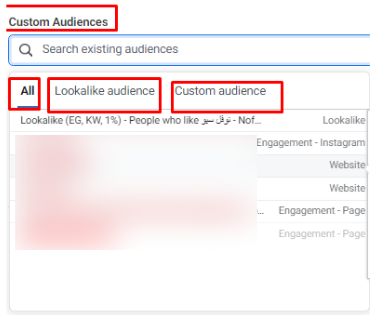
- You can choose the audience you want, let’s say you want one of the custom audiences, click on “Custom Audiences”, and then choose the audience you want to choose.
- Note that in the case of choosing an audience from the custom audiences, you can choose more than one audience at the same time, and this is an advantage unlike the saved audience, you choose only one audience.
- You can also choose similar audiences, so that the ad will be shown to all the audiences you have chosen, as we can see:
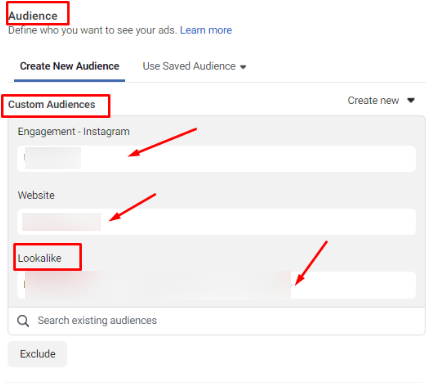
Thus, we have created custom audiences in Facebook ads and Similar audiences on Facebook, and we have used both of them in making ads.
Do you need a consultation about this topic?
Contact on WhatsApp
