

Book a Free Consultation Now
Would you like to know more about this topic?
Contact us on WhatsApp and get a free consultation from our experts
Contact on WhatsApp NowA Noindex Check is the process of identifying whether a webpage is intentionally or accidentally blocked from appearing in search engine results using noindex directives. It helps website owners and SEO specialists detect indexing issues, prevent valuable pages from being excluded, and maintain healthy index coverage across a site. At Nofal Seo, we perform in-depth noindex checks as part of our technical SEO services to ensure important pages are indexed correctly and contribute to sustainable organic growth.
What is Noindex Check?
A Noindex Check is the process of verifying whether a webpage is intentionally or unintentionally blocked from appearing in search engine results. When performing a Noindex Check, SEO specialists review page settings, source code, and HTTP headers to confirm if search engines are instructed not to index a specific URL. This check is critical when important pages are missing from Google results or when errors appear in Google Search Console related to indexing.
The main purpose of a Noindex Check is to prevent SEO issues caused by accidental blocking of valuable pages. Many websites apply noindex tags for valid reasons, such as duplicate pages or private content, but problems arise when high-value pages like blog posts, service pages, or landing pages are mistakenly excluded. Regular noindex checks help maintain healthy index coverage and protect organic visibility.
This topic is closely related to technical SEO audits, index coverage issues, meta robots tags, Google Search Console errors, and page indexing analysis. At Nofal Seo, we perform detailed noindex checks as part of our technical SEO process to ensure that every important page is indexed correctly and contributes to search traffic growth.
To understand what a Noindex Check involves, consider the following steps:
-
Reviewing the page source code to detect meta robots noindex directives
-
Checking HTTP response headers for X-Robots-Tag noindex instructions
-
Verifying index status using Google Search Console and URL Inspection
-
Identifying whether noindex usage is intentional or a configuration error
-
Fixing incorrect noindex settings to restore visibility in search results
What does noindex do?
The noindex directive tells search engines not to include a specific page in their search results, even if the page is accessible and crawlable. When a Noindex Check is applied, it confirms whether this instruction exists and explains why Google is intentionally excluding the page from indexing. This directive is commonly used to control which pages should remain hidden from search engines, such as duplicate pages, internal filters, or non-public content.
Using noindex correctly helps website owners maintain a clean and focused index by ensuring that only valuable and relevant pages appear in search results. However, if applied incorrectly, it can prevent important pages from ranking, reduce organic traffic, and cause visibility issues that may go unnoticed without proper monitoring.
This concept is strongly connected to meta robots tags, indexing control, SEO best practices, duplicate content management, and Google indexing rules. At Nofal Seo, we help businesses decide when noindex should be used and when it should be removed to protect search visibility and performance.
Noindex works by controlling indexing in the following ways:
-
It blocks a page from appearing in search results without blocking crawling
-
It allows search engines to follow links on the page unless combined with nofollow
-
It helps prevent low-value or duplicate pages from being indexed
-
It gives site owners precise control over index coverage
-
It must be used carefully to avoid accidental traffic loss
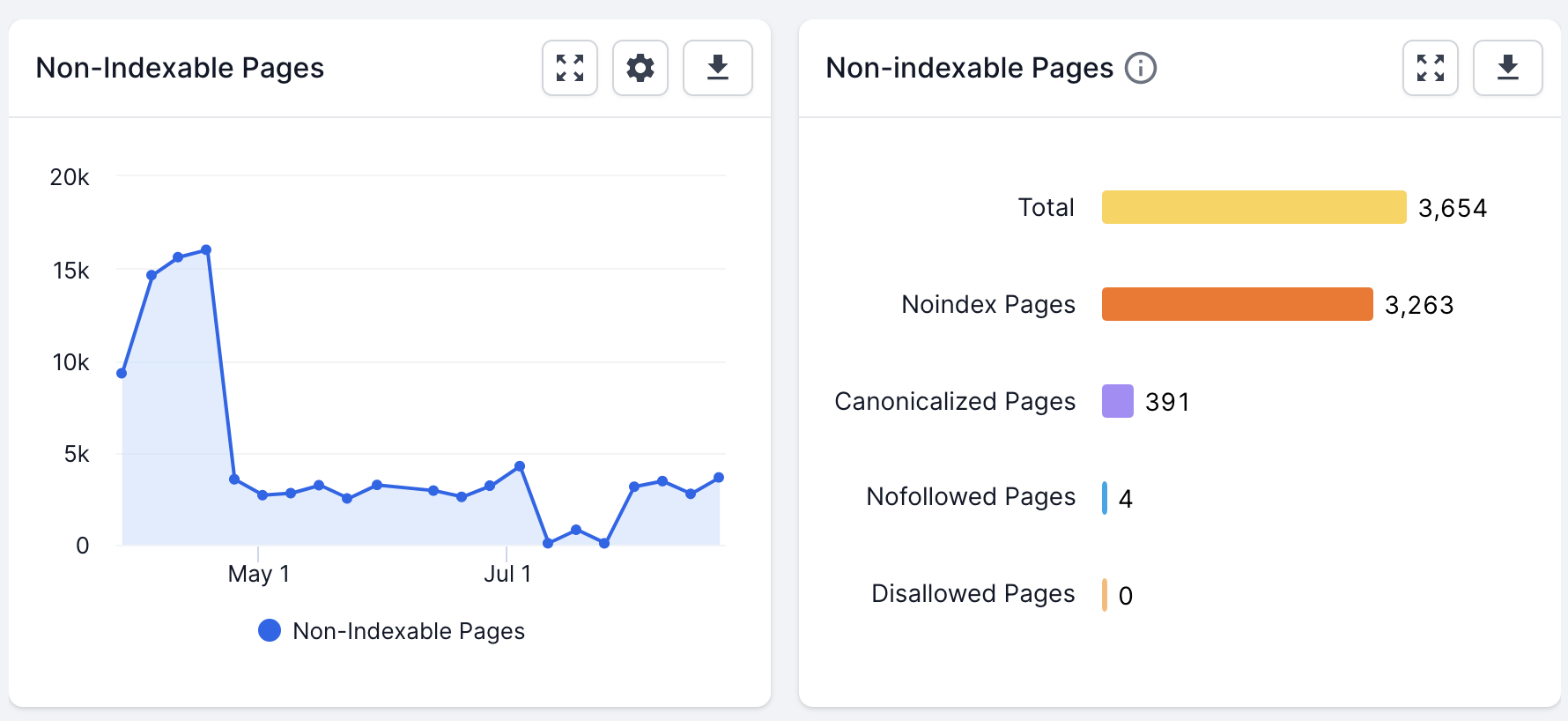
How to check noindex?
Checking for noindex involves reviewing both the page code and technical signals that communicate indexing instructions to search engines. A proper Noindex Check ensures that search engines are not being instructed to exclude important pages due to hidden meta tags or server-level directives. This step is essential when pages fail to appear in search results or trigger indexing errors in Google Search Console.
The process of checking noindex should always be systematic and data-driven. It requires validating what search engines see rather than relying on assumptions. Regular checks help detect configuration mistakes early and ensure indexing rules align with SEO goals.
This process is commonly associated with technical SEO audits, page source inspection, X-Robots-Tag headers, URL inspection tools, and index coverage troubleshooting. At Nofal Seo, we perform comprehensive noindex checks to identify and fix indexing blockers before they impact rankings.
To check whether a page is marked as noindex, follow these steps:
-
View the page source and search for a meta robots noindex directive
-
Check HTTP headers for an X-Robots-Tag set to noindex
-
Use Google Search Console URL Inspection to confirm index status
-
Test the page using SEO browser extensions or crawling tools
-
Compare results with sitemap and indexing reports
How to check the indexing status?
Checking the indexing status means confirming whether a page is currently indexed, excluded, or blocked from appearing in search results. A proper Noindex Check helps determine if the page is visible to search engines or if it has been intentionally or accidentally excluded due to technical settings. This step is essential when pages do not rank or fail to appear despite being submitted for indexing.
Indexing status should always be checked using official search engine tools rather than assumptions. Relying on accurate data ensures that SEO decisions are based on how search engines actually process the page, not how it appears from the user’s perspective.
This topic is closely related to Google Search Console, URL Inspection, index coverage reports, search visibility, and technical SEO diagnostics. At Nofal Seo, we use indexing status checks to identify hidden issues that prevent pages from contributing to organic growth.
To check the indexing status of a page, follow these steps:
-
Use Google Search Console and open the URL Inspection tool
-
Enter the full page URL and review the indexing result
-
Check whether the page is indexed, excluded, or blocked
-
Review the reason provided by Google for non-indexed pages
-
Compare the result with sitemap and robots directives
How do I noindex a site?
Noindexing a site or specific pages means instructing search engines not to include those pages in search results. When performing a Noindex Check, this step confirms whether the noindex directive has been correctly applied to prevent indexing without affecting crawlability. Noindexing is commonly used for private pages, duplicate content, internal search results, or low-value URLs.
Applying noindex should always be intentional and carefully planned. Incorrect implementation can remove valuable pages from search results and cause significant traffic loss if not monitored properly.
This action is commonly associated with meta robots settings, HTML indexing control, X-Robots-Tag headers, SEO configuration, and site-wide indexing rules. At Nofal Seo, we help businesses apply noindex safely without harming overall SEO performance.
To noindex a page or site correctly, follow these steps:
-
Add a meta robots tag with noindex inside the page’s HTML head
-
Or apply an X-Robots-Tag noindex directive via server headers
-
Decide whether noindex should be page-specific or site-wide
-
Ensure the page is not blocked by robots.txt if crawling is needed
- Recheck indexing status after implementation
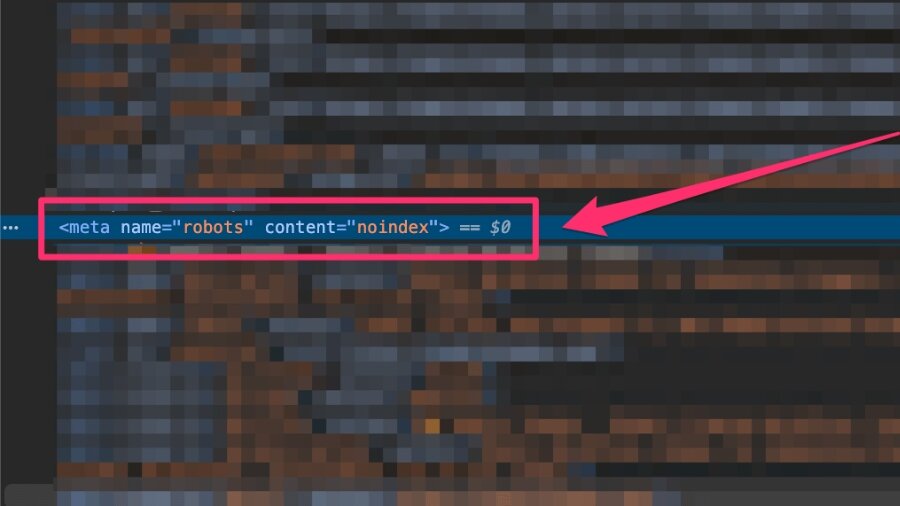
What does the error mean?
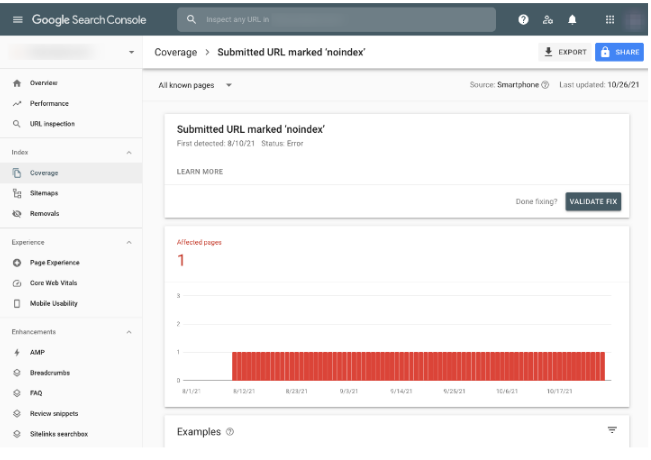
Check if URLs are marked as ‘Noindex’
At first, open the page source of the URL categorized by this error and check Noindex. Then check if the header includes the bots “noindex” meta tag, as shown in the image below.
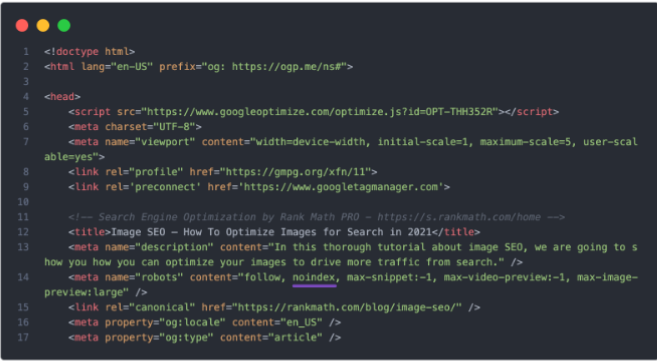
Set the page URL on NoIndex correctly
If your page’s URL is set to noindex correctly, but you’re still seeing this error, it’s possible that Google hasn’t crawled your page since the changes were made.
Check if the sitemap can be accessed
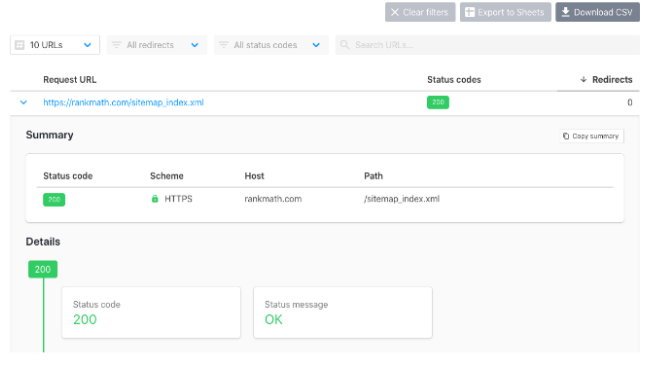
So you should check if Google is able to access your website map. Head over to your website’s map and check if it can be accessed. You can also make use of this tool to check if your sitemap can be accessed or if there is an error. If your sitemap returns a 404 error, you can refer to our tutorial to fix that.
If for any other reason your sitemap is inaccessible, you should be able to discover it now, so you can sort it accordingly.
Check if your sitemap is cached
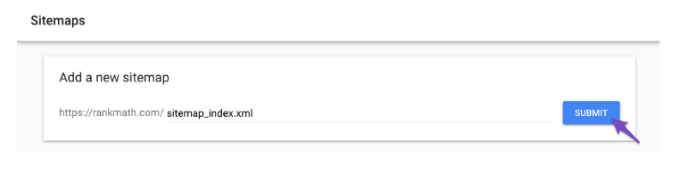
Resubmit your Sitemap in Google Search Console
Once the problem with the sitemap is fixed, remove the sitemap from Google Search Console and submit it again.
The page URL is set to NoIndex incorrectly
If your page is set with noindex incorrectly, you must change your Rank Math settings to add the index bots meta tag.
Check out Rank Math Metabox
Start by opening the post / page / taxonomy term in the WordPress editor. In the case of the Gutenberg editor, click the Rank Math SEO icon in the top-right corner of the page to open the Rank Math Metabox.

For the Classic Editor and Ranking Terms, scroll down to the bottom of the page to find Rank Math Metabox.

If the Rank Math Metabox is not available to you, make sure you have enabled Add SEO controls from Rank Math > Titles & Meta Settings > Posts (or other related sections).

Check Rank Math titles and meta settings
While the previous step allows you to modify the noindex meta tag for specific posts, you still have to confirm that the Noindex is checked and that noindex is set as the default in the Heading and Meta settings. So go to WordPress Dashboard > Rank Math > Titles & Meta. Then check each tab and make sure the settings are as per your preference. If the posts and ratings that are set as “noindex” are according to your preference, you can ignore them. Or, if you consider that these pages add more value to your visitors and need to be indexed, you can index these pages by selecting a robots meta tag “index” as shown below.
- Once you make the changes, don’t forget to click the Save Changes button at the bottom of the page so the changes are reflected.
Remove NoIndex with Bulk Actions PRO
If you have a number of posts on your website that are mistakenly set to noindex, you can take advantage of our bulk actions feature to set them for indexing. Here you can find out how Noindex is checked.
- Head over to the WordPress post list, and from the Rank Math filter that appears on the top right of the screen
- Choose Articles Noindexed . Then click on the Filter option as shown below.
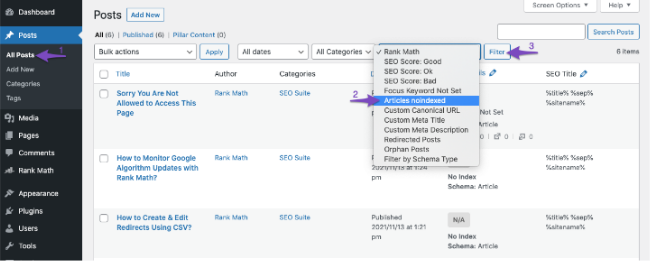
- All your articles set with the noindex tag will now be filtered.
- You can select the checkbox that appears at the top to select all of your posts.
- In the event that you want to select/uncheck certain posts, the checkbox that appears before posts will help you with that.
- Then from the Bulk Actions dropdown menu, choose Set to Index. Then click on Apply.
- Now all of your selected posts will be set to the index.
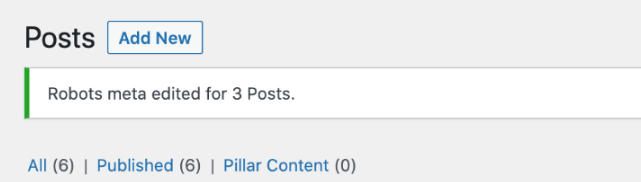
Once you make the changes, you can check your page source code to see if the noindex meta tag has been removed.
Final Words – Fix Validation in Google Search Console
Finally, make sure your sitemap is up to date. Then, you can head over to Google Search Console and choose the Check for Repair option to let the search engine know what error is being resolved. Then, you can wait for Google to crawl your website and remove the error notification from the search console.

This is all about Noindex Check If you still have any questions about this error and how to solve it. you are always welcome my friend, to contact our dedicated support team at Nofal SEO, we are available 24/7, to assist you.
Do you need a consultation about this topic?
Contact on WhatsApp
